Ubuntu server not automatically mount USB disk like the behavior at Ubuntu desktop. So here the step to mount USB Disk at Ubuntu server
1. Plug you USB disk
2. type "tail /var/log/messages"
- This will show how Ubuntu server recognize the USB Disk
3. Mount the disk..
Thursday, July 17, 2008


Friday, March 14, 2008
Python script from my prevois entry
Like I say I will post my python script from my previous entry, Because I'm very2 new to pyhton (1 week to be precise) so if there's something wrong with this code..so I'm sorry, but this code work fine for me. you can see the code here it's a google doc document. Because when I try to put on this blog, it a mess...
Publish NTBackup log to Internal Web server
Creating a web based backup log for your NTBackup
NTBackup is a backup tools from microsoft, it's usually already installed on your windows
machine. After the backup finish NTBackup create a backupog, but the sucks thing is, that
we can not change the directory where NTBackup log reside. The backup log locate at
"C:\Documents and Settings\%USER%\Local Settings\Application Data\Microsoft\Windows NT\NTBackup\data"
At my office we use NTBackup to perform the system state backup, and the backup result need to be checked every morning.
Because the NTBackup run with administrator priveledges, So i need to create a way so other people can review the backup
file without login to that server. And the answer is to publish the backuplog to our internal web server.
To do that I use rsync to syncronize the backup log our Linux based web server. But there's a problem with the logfile,
after it was syncronized using rsync, the problem related with character encoding. If we open that backup log on firefox It will show funny characters (see image bellow)

To handle this problem I use python script to change the encoding.
This script also will run the rsync command and generate HTML file.
I will post this python script on my next blog.
To Configure rsync on windows see Brent Noris Homepage about installing rsync on windows
Here the part of my rsync configuration to point to the NTBackup Log directory
[backuplog]
path = C:/Documents and Settings/Administrator/Local Settings/Application Data/Microsoft/Windows NT/NTBackup/data
read only = yes
After you finish configure the rsync on your windows machine, edit your crontab, then add the python script to your crontab entry.
NTBackup is a backup tools from microsoft, it's usually already installed on your windows
machine. After the backup finish NTBackup create a backupog, but the sucks thing is, that
we can not change the directory where NTBackup log reside. The backup log locate at
"C:\Documents and Settings\%USER%\Local Settings\Application Data\Microsoft\Windows NT\NTBackup\data"
At my office we use NTBackup to perform the system state backup, and the backup result need to be checked every morning.
Because the NTBackup run with administrator priveledges, So i need to create a way so other people can review the backup
file without login to that server. And the answer is to publish the backuplog to our internal web server.
To do that I use rsync to syncronize the backup log our Linux based web server. But there's a problem with the logfile,
after it was syncronized using rsync, the problem related with character encoding. If we open that backup log on firefox It will show funny characters (see image bellow)

To handle this problem I use python script to change the encoding.
This script also will run the rsync command and generate HTML file.
I will post this python script on my next blog.
To Configure rsync on windows see Brent Noris Homepage about installing rsync on windows
Here the part of my rsync configuration to point to the NTBackup Log directory
[backuplog]
path = C:/Documents and Settings/Administrator/Local Settings/Application Data/Microsoft/Windows NT/NTBackup/data
read only = yes
After you finish configure the rsync on your windows machine, edit your crontab, then add the python script to your crontab entry.
Friday, January 25, 2008
Compatibility Problem between Citrix Memory Optimization and SAP GUI.
If you published your SAP GUI to the Citrix PS, than there is a chance you get an error message like this "CSapEditorCtrl::GetObject: Object x does not exist". This error caused by Incompatibility between the SAP GUI and Citrix Memory Optimization. To solve this error you must exclude the SAP GUI from Citrix Memory Optimization. To do that here the step
1. Deactivate Citrix Memory Optimization, to desctivate this feature, go to Citrix Management Console
Click Properties at your Farm Name, then Memory/CPU Utilization Management Disable the memory Optimization
2. Exclude the SAP GUI from Citrix Memory Optimization Process.
Open the register editor(regedit), see the "HKEY_LOCAL_MACHINE\SOFTWARE\Citrix\SFO\ProcessExclusionList", for example if yours
SAP GUI Located at "C:\Program Files\SAP\Front End\SAPGui", than add entry for DWORD which contain "C:\Program Files\SAP\Front End\SAPGui\*.*". Set the Value data to 0.
After that run the ADSCleaner.exe, this tools will list and delete the data streams that created by Citrix Memory Optimization.
After that restart this server this step only to make sure the changes that we made on the ProcessExclusionList registry. Than Activate Again the Citrix Memory Optimization.
1. Deactivate Citrix Memory Optimization, to desctivate this feature, go to Citrix Management Console
Click Properties at your Farm Name, then Memory/CPU Utilization Management Disable the memory Optimization
2. Exclude the SAP GUI from Citrix Memory Optimization Process.
Open the register editor(regedit), see the "HKEY_LOCAL_MACHINE\SOFTWARE\Citrix\SFO\ProcessExclusionList", for example if yours
SAP GUI Located at "C:\Program Files\SAP\Front End\SAPGui", than add entry for DWORD which contain "C:\Program Files\SAP\Front End\SAPGui\*.*". Set the Value data to 0.
After that run the ADSCleaner.exe, this tools will list and delete the data streams that created by Citrix Memory Optimization.
After that restart this server this step only to make sure the changes that we made on the ProcessExclusionList registry. Than Activate Again the Citrix Memory Optimization.
Tuesday, January 22, 2008
Installing pnp ( PNP is not PerfParse ) at CentOs 5
Because nagios not come with tools to generate chart, so I need another tools to this job.
I found several tools for this task such as perfparse, NagiosGrapher, nagiosstat, and pnp.
After try to install some of this tools I choose to use pnp. I use pnp because it's easy to install.
To install pnp first read the documentation then proceed with the installation step
./configure --sysconfdir=/etc/nagios --datadir=/usr/share/nagios/pnp --bindir=/usr/bin --localstatedir=/var/nagios
you will see the configuration summary
 make all && make install
Then you finish with the installation.
Now we gonna edit our configuration files.
For the first step edit the nagios configuration file, at my system it is the nagios.cfg, edit the following lines

Now edit the command definition file at my system it's called commands.cfg, edit the process-service-perfdata definition
at the command-line section set the value to /usr/bin/perl /usr/local/nagios/libexec/process_perfdata.pl.
here the process-service-perfdata section at my commands.cfg

According to pnp documentation process_perfdata.pl can not start under ePN(embeded Perl Nagois), that's why we must put the perl full path.
This type of configuration is default mode. There are others type of configuration mode, they are Bulk Mode and Bulk Mode with NPCD.
Create 2 other files serviceextinfo.cfg and hostextinfo.cfg. Both file name must match with the file name at Extended host/service info definitions section in the nagios configuration file (see above).
to create both files use this command "touch serviceextinfo.cfg hostextinfo.cfg"
Then edit both file.Here the content of my serviceextinfo.cfg (this will monitor the CPULoad at my windows machine)

The service_description must be the same at your service configuration file.
And for the hostextinfo,cfg

At my system I also edit the config.php, which the configuration file for pnp, I only change the temp directory to /tmp/nagios
$conf['temp'] = /tmp/nagios
Stop the nagios service, and then use the nagios command with -v parameter to check if there are no errors at your configuration file.
If everything is ok then star tthe nagios service then you are done.
To check if your installation success, see at the RRD direcotry whether the rrd and xml files generated on that place.
I got a problem with SELinux feature, that casue the pnp can not read it's RRD dabatabase directory. I still not figure out how to
fix this, so for now I disabled SELinux on my system.
I found several tools for this task such as perfparse, NagiosGrapher, nagiosstat, and pnp.
After try to install some of this tools I choose to use pnp. I use pnp because it's easy to install.
To install pnp first read the documentation then proceed with the installation step
./configure --sysconfdir=/etc/nagios --datadir=/usr/share/nagios/pnp --bindir=/usr/bin --localstatedir=/var/nagios
you will see the configuration summary
 make all && make install
Then you finish with the installation.
Now we gonna edit our configuration files.
For the first step edit the nagios configuration file, at my system it is the nagios.cfg, edit the following lines


Now edit the command definition file at my system it's called commands.cfg, edit the process-service-perfdata definition
at the command-line section set the value to /usr/bin/perl /usr/local/nagios/libexec/process_perfdata.pl.
here the process-service-perfdata section at my commands.cfg

According to pnp documentation process_perfdata.pl can not start under ePN(embeded Perl Nagois), that's why we must put the perl full path.
This type of configuration is default mode. There are others type of configuration mode, they are Bulk Mode and Bulk Mode with NPCD.
Create 2 other files serviceextinfo.cfg and hostextinfo.cfg. Both file name must match with the file name at Extended host/service info definitions section in the nagios configuration file (see above).
to create both files use this command "touch serviceextinfo.cfg hostextinfo.cfg"
Then edit both file.Here the content of my serviceextinfo.cfg (this will monitor the CPULoad at my windows machine)

The service_description must be the same at your service configuration file.
And for the hostextinfo,cfg

At my system I also edit the config.php, which the configuration file for pnp, I only change the temp directory to /tmp/nagios
$conf['temp'] = /tmp/nagios
Stop the nagios service, and then use the nagios command with -v parameter to check if there are no errors at your configuration file.
If everything is ok then star tthe nagios service then you are done.
To check if your installation success, see at the RRD direcotry whether the rrd and xml files generated on that place.
I got a problem with SELinux feature, that casue the pnp can not read it's RRD dabatabase directory. I still not figure out how to
fix this, so for now I disabled SELinux on my system.
Monday, January 21, 2008
Nagios monitoring tools...
Because the nature of my job as System Engineer, and also as Administrator for my division, which running 24x7 so I must know which computer that having sluggish performance, before the computer became useless in daily operational.
My division is a collaboration between Indonesia company and a Dutch based company..well they outsource some of their task to my division, including monitoring task, they use BMC Patrol for monitoring their customer environment.
BMC Patrol is a powerful tools,but is very expensive.Because I only need to monitoring my division environment, so I must use a cost free tools (because there is no way the management will permit me to buy a monitoring tools), and after googling i found a monitoring tools that called nagios.I like nagios because it a great tools with free of charge, and the most important it's open source.Nagios can monitor anything on your computer with the help of its plugin. There are lots of plugin for nagios, such as plugin to monitor mysql server, Citrix, Oracle, CPU, memory, etc. Well there are lots of plugin for nagios, so it's almost imposibble to mention then one by one. You can find nagios at their web www.nagios.org, there are documentation for that, and also you can use google to find help when you stuck with nagios.
But when you installing nagios from the source you must have lot of patient and read the documentation over and over again.
For me I use the rpm package from rpmforge, only need to run the yum command, then the nagios automatically installed on your system.
After you installed then you must configure the nagio configuration file, and what I like from linux is the configuration file use text, and not registry like the one you find a windows system.Because I use centos as the nagios server I use the guide from Max Hetrick at the centos wiki here the web http://wiki.centos.org/HowTos/Nagios. Because nagios not provide a graphic output so you need an add-on to generate chart, for this i use pnp(PNP is not PerfParse ), it's a great tools and quite easy to installed.
Because all the computer at my division ia a windows machine (except for the nagios server), i use the NSClient++ at the windows machine, and at the nagios server I use check_nt plugin. You can monitor all the counter you can find at windows performance counter. To see which counter available at your computer just use the perfmon snap-in. For start see this link http://nagios.sourceforge.net/docs/3_0/monitoring-windows.html.
My division is a collaboration between Indonesia company and a Dutch based company..well they outsource some of their task to my division, including monitoring task, they use BMC Patrol for monitoring their customer environment.
BMC Patrol is a powerful tools,but is very expensive.Because I only need to monitoring my division environment, so I must use a cost free tools (because there is no way the management will permit me to buy a monitoring tools), and after googling i found a monitoring tools that called nagios.I like nagios because it a great tools with free of charge, and the most important it's open source.Nagios can monitor anything on your computer with the help of its plugin. There are lots of plugin for nagios, such as plugin to monitor mysql server, Citrix, Oracle, CPU, memory, etc. Well there are lots of plugin for nagios, so it's almost imposibble to mention then one by one. You can find nagios at their web www.nagios.org, there are documentation for that, and also you can use google to find help when you stuck with nagios.
But when you installing nagios from the source you must have lot of patient and read the documentation over and over again.
For me I use the rpm package from rpmforge, only need to run the yum command, then the nagios automatically installed on your system.
After you installed then you must configure the nagio configuration file, and what I like from linux is the configuration file use text, and not registry like the one you find a windows system.Because I use centos as the nagios server I use the guide from Max Hetrick at the centos wiki here the web http://wiki.centos.org/HowTos/Nagios. Because nagios not provide a graphic output so you need an add-on to generate chart, for this i use pnp(PNP is not PerfParse ), it's a great tools and quite easy to installed.
Because all the computer at my division ia a windows machine (except for the nagios server), i use the NSClient++ at the windows machine, and at the nagios server I use check_nt plugin. You can monitor all the counter you can find at windows performance counter. To see which counter available at your computer just use the perfmon snap-in. For start see this link http://nagios.sourceforge.net/docs/3_0/monitoring-windows.html.
Friday, January 11, 2008
Don't use Process Monitor at Windows 2000
Yesterday, I try ProcMon at one of my customer server, that server is a Windows 2000 SP4 with Update Rollup 1, so I think the ProcMon should be running smoothly on that server, but after I start that application and click the Agree button , the server restart it self... it seems the server got crash and it took more than 10 minutes so that server finish it boot process. Thank god I try that outside office hour, if i do that while the customer still work..you can guess what kind of email i will got here... There should be a warning at the Process Monitor web , that this tool can cause crash on windows 2000.... btw I use this tool because it is recommended by MS at their technet web.... well that a story of the day ,,,
Thursday, December 06, 2007
Enabling Cirix client Access at ISA 2004
Few days ago i need to enable Citrix access at my client to their Citrix server at Singapore.
They use ISA 2004 as their firewall.
At ISA 2004 there already a template for ICA protocol, but the
problem is this template useless, i already try to use that, but internal network still can't access
the citrix server.
So as solution I create a "Custom ICA" protocol. Just use the ICA template from ISA 2004
as your reffences to create the Custom protocol, the only different is put the Port 1604/UDP at
Primary connection, rather then at secondary connection like at the template.
Here the different between the ISA template and the Custom
ICA Template from ISA 2004

Custom ICA Protocol

After you create that "Custom ICA" protocol, then create a new firewall policy, see the bellow picture asyour refference.

They use ISA 2004 as their firewall.
At ISA 2004 there already a template for ICA protocol, but the
problem is this template useless, i already try to use that, but internal network still can't access
the citrix server.
So as solution I create a "Custom ICA" protocol. Just use the ICA template from ISA 2004
as your reffences to create the Custom protocol, the only different is put the Port 1604/UDP at
Primary connection, rather then at secondary connection like at the template.
Here the different between the ISA template and the Custom
ICA Template from ISA 2004

Custom ICA Protocol

After you create that "Custom ICA" protocol, then create a new firewall policy, see the bellow picture asyour refference.

Friday, November 30, 2007
WinDbg and BSOD
- Downloads Windows debugger from Microsoft Web, after that install that Application at your Computer
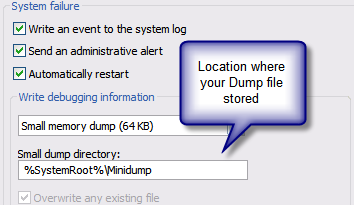
- Find where your Windows store your debugging information.
- To find out where your windows hide your Debugging info Right Click the "My Computer" Icon.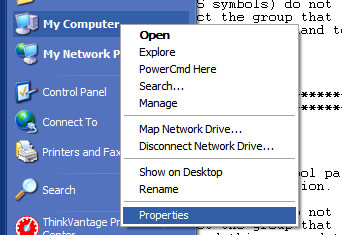
- Select Property then go to Advanced Tab.
- At the Startup and recovery Section click the Settings button.
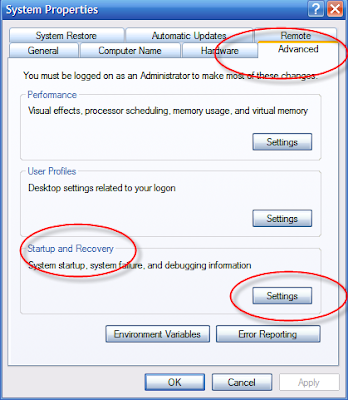
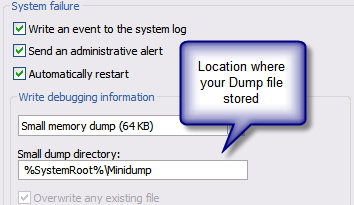
- Now you can see where your Windows store it's Dump file.
- For the start menu Start -> All Programs -> Debugging Tools for Windows -> WinDbg
- Now Open the dump file, go to File -> Open Crash Dump, then navigate to directory where the dump file stored.
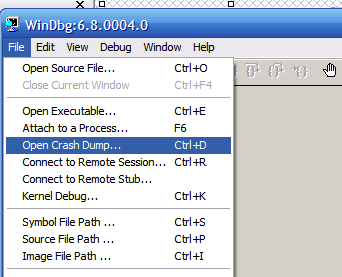
- After you Open that file you will see lot of info. You can find the cause of BSOD, see at the bottom.
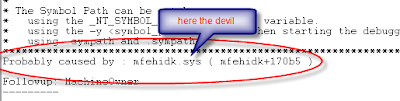
- As you can see the cause of the BSOD on my server is a file called mfehidk.sys, which a processes belongin to McAffe AV ( and that sucks)
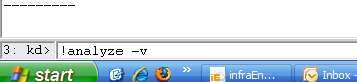
- For detailed debugging info you can use command !analize -v , at the commad field
- Find where your Windows store your debugging information.
- To find out where your windows hide your Debugging info Right Click the "My Computer" Icon.

- Select Property then go to Advanced Tab.
- At the Startup and recovery Section click the Settings button.

- Now you can see where your Windows store it's Dump file.
- For the start menu Start -> All Programs -> Debugging Tools for Windows -> WinDbg
- Now Open the dump file, go to File -> Open Crash Dump, then navigate to directory where the dump file stored.

- After you Open that file you will see lot of info. You can find the cause of BSOD, see at the bottom.

- As you can see the cause of the BSOD on my server is a file called mfehidk.sys, which a processes belongin to McAffe AV ( and that sucks)
- For detailed debugging info you can use command !analize -v , at the commad field

Tuesday, November 27, 2007
How to Update to Win XP Sp3 with registry hack
Yesterday I found an article how to hack Win Xp registry so I can update to SP 3 rc1 . I found that article at this link "http://dailyapps.net/2007/11/hack-attack-get-windows-xp-sp3-through-windows-update/"
here the script
@echo off
reg delete HKEY_LOCAL_MACHINE\SOFTWARE\Microsoft\Windows\CurrentVersion\WindowsUpdate\XPSP3 /f 2> NUL
reg add HKEY_LOCAL_MACHINE\SOFTWARE\Microsoft\Windows\CurrentVersion\WindowsUpdate\XPSP3 /v RCPreview /t REG_SZ /d 1c667073-b87f-4f52-a479-98c85711d869 /f
echo XPSP3 registry key has been set. Please check for updates in Windows Update - Kudos to dailyapps.net
pause
copy paste that script to notepad, then save as winxpsp3hack.cmd.
Double click that file, just follow the instruction.
After that update your windows via automatic update.
here the script
@echo off
reg delete HKEY_LOCAL_MACHINE\SOFTWARE\Microsoft\Windows\CurrentVersion\WindowsUpdate\XPSP3 /f 2> NUL
reg add HKEY_LOCAL_MACHINE\SOFTWARE\Microsoft\Windows\CurrentVersion\WindowsUpdate\XPSP3 /v RCPreview /t REG_SZ /d 1c667073-b87f-4f52-a479-98c85711d869 /f
echo XPSP3 registry key has been set. Please check for updates in Windows Update - Kudos to dailyapps.net
pause
copy paste that script to notepad, then save as winxpsp3hack.cmd.
Double click that file, just follow the instruction.
After that update your windows via automatic update.
Sunday, October 28, 2007
Network Configuration File for RedHat/CentOS/Fedora
Because I work with my Linux Server directly from terminal, No fancy GUI. So I edit the network configuration
directly to ifcfg-ethx file (x = NIC Index), the file name depend to your device name, for example my Linux Server
Only have 1 network card so the configuration will had name ifcfg-eth0.
The configuration file located at /etc/sysconfig/network-scripts directory.
Here the the network file configuration when assign static IP
DEVICE=eth0
BOOTPROTO=none #If DHCP, then change to yes
HWADDR=00:00:1C:0A:AC:60 #MAC Addr
ONBOOT=yes #Set active on boot
TYPE=Ethernet
NETWORK=192.168.1.0
NETMASK=255.255.255.0
IPADDR=192.168.1.10
USERCTL=no #Set Yes if you want te ordinary user change the Network configuratin
IPV6INIT=no
PEERDNS=yes
GATEWAY=192.168.1.254
Here for DHCP
DEVICE=eth0
BOOTPROTO=dhcp
HWADDR=00:00:1C:0A:AC:60
ONBOOT=yes
TYPE=Ethernet
#NETWORK=192.168.1.0
#NETMASK=255.255.255.0
#IPADDR=192.168.1.10
#USERCTL=no
DHCP_HOSTNAME=komputerku.rumahku.local
#IPV6INIT=no
#PEERDNS=yes
#GATEWAY=172.17.8.254
And here for DNS servers
nameserver: 192.168.1.1
nameserver: 192.168.1.2.
For the DNS server, you can edit the file resolv.conf, you can find that at /etc directory.
When you finished, then restart the Network service, you can use command "/sbin/service network restart"
or "/etc/init.d/network restart". You must have root privilege to run both those command.
directly to ifcfg-ethx file (x = NIC Index), the file name depend to your device name, for example my Linux Server
Only have 1 network card so the configuration will had name ifcfg-eth0.
The configuration file located at /etc/sysconfig/network-scripts directory.
Here the the network file configuration when assign static IP
DEVICE=eth0
BOOTPROTO=none #If DHCP, then change to yes
HWADDR=00:00:1C:0A:AC:60 #MAC Addr
ONBOOT=yes #Set active on boot
TYPE=Ethernet
NETWORK=192.168.1.0
NETMASK=255.255.255.0
IPADDR=192.168.1.10
USERCTL=no #Set Yes if you want te ordinary user change the Network configuratin
IPV6INIT=no
PEERDNS=yes
GATEWAY=192.168.1.254
Here for DHCP
DEVICE=eth0
BOOTPROTO=dhcp
HWADDR=00:00:1C:0A:AC:60
ONBOOT=yes
TYPE=Ethernet
#NETWORK=192.168.1.0
#NETMASK=255.255.255.0
#IPADDR=192.168.1.10
#USERCTL=no
DHCP_HOSTNAME=komputerku.rumahku.local
#IPV6INIT=no
#PEERDNS=yes
#GATEWAY=172.17.8.254
And here for DNS servers
nameserver: 192.168.1.1
nameserver: 192.168.1.2.
For the DNS server, you can edit the file resolv.conf, you can find that at /etc directory.
When you finished, then restart the Network service, you can use command "/sbin/service network restart"
or "/etc/init.d/network restart". You must have root privilege to run both those command.
Saturday, October 27, 2007
Don't move Exchange Security Related Groups
Few day ago, I got call from the Office, they told me that one of our client exchange server got problem.
The exchange services can not start. It took hours to start the server, and sometime they must unlpug the network cable, from server NIC (Yeah good idea). After I came, I see that their try to install the Exchange SP2,but the installation procceses always end up with error.
The person who in charge, told me that there are problem with connection to Domain Controller. After I see the Event viewer I see there are lot of event with Id 9157 with source MSExchangeSA. Here the details of the event
Event Type: Warning Event
Source: MSExchangeSA
Event Category: General
Event ID: 9157
Date: 10/27/2007
Time: 11:57:32 AM
User: N/A
Computer: [Server Name]
Description: Microsoft Exchange System Attendant does not have sufficient rights to read Exchange configuration objects in Active Directory. Wait for replication to complete and then check to make sure the computer account is a member of the "Exchange Domain Servers" security group.
For more information, click http://www.microsoft.com/contentredirect.asp.
Apparently the Microsoft Exchange System Attendant service failed to start. This service is the most important service used by Exchange Server.
Because this service perform the important task, such as DS Lookup and other important task. If this service failed to start at least 3 other services will failed to start
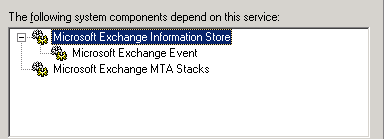
Here the Description for Microsoft Exchange System Attendant service:
Provides monitoring, maintenance, and Active Directory lookup services, for example, monitoring of services and connectors,defragmenting the Exchange store, and forwarding Active Directory lookups to a Global Catalog server.
If this service is stopped, monitoring, maintenance, and lookup services are unavailable.
If this service is disabled, any services that explicitly depend on it will fail to start.
After some search from eventid.net and Google, apparently the main cause of this event because two security that related to Exchange
(Exchange Enterprise Servers and Exchange Domain Servers) moved to other OU. Looks like MS hard coded the Exchange to search both Security Group at User container. After I move back both Exchange and Start the Microsoft Exchange System Attendant, the problem
solved.
The exchange services can not start. It took hours to start the server, and sometime they must unlpug the network cable, from server NIC (Yeah good idea). After I came, I see that their try to install the Exchange SP2,but the installation procceses always end up with error.
The person who in charge, told me that there are problem with connection to Domain Controller. After I see the Event viewer I see there are lot of event with Id 9157 with source MSExchangeSA. Here the details of the event
Event Type: Warning Event
Source: MSExchangeSA
Event Category: General
Event ID: 9157
Date: 10/27/2007
Time: 11:57:32 AM
User: N/A
Computer: [Server Name]
Description: Microsoft Exchange System Attendant does not have sufficient rights to read Exchange configuration objects in Active Directory. Wait for replication to complete and then check to make sure the computer account is a member of the "Exchange Domain Servers" security group.
For more information, click http://www.microsoft.com/contentredirect.asp.
Apparently the Microsoft Exchange System Attendant service failed to start. This service is the most important service used by Exchange Server.
Because this service perform the important task, such as DS Lookup and other important task. If this service failed to start at least 3 other services will failed to start

Here the Description for Microsoft Exchange System Attendant service:
Provides monitoring, maintenance, and Active Directory lookup services, for example, monitoring of services and connectors,defragmenting the Exchange store, and forwarding Active Directory lookups to a Global Catalog server.
If this service is stopped, monitoring, maintenance, and lookup services are unavailable.
If this service is disabled, any services that explicitly depend on it will fail to start.
After some search from eventid.net and Google, apparently the main cause of this event because two security that related to Exchange
(Exchange Enterprise Servers and Exchange Domain Servers) moved to other OU. Looks like MS hard coded the Exchange to search both Security Group at User container. After I move back both Exchange and Start the Microsoft Exchange System Attendant, the problem
solved.
Wednesday, October 24, 2007
Gutsy Gibbon and Thinkpad T61
A Week before the final release, I donwload the rc version , and installed to my T61.
The first problem that I got with Gutsy is I need to set the SATA configuration to compatibility mode, instead AHCI.This make Vista run very slow. I still use windows because my job.
Beside that the Wireless NIC unstable, some time I can not change to other network.
Other than thoese 2 problems, Gutsy run well on my T61 , I hope there are solution for the AHCI problem. I hope.
The first problem that I got with Gutsy is I need to set the SATA configuration to compatibility mode, instead AHCI.This make Vista run very slow. I still use windows because my job.
Beside that the Wireless NIC unstable, some time I can not change to other network.
Other than thoese 2 problems, Gutsy run well on my T61 , I hope there are solution for the AHCI problem. I hope.
Thursday, October 11, 2007
That's is I'm done with Vista
That's it I'm done with, that OS is the most useless OS that I ever use that is a CRAP , I'm gonna change to XP again and I'll install Linux to my notebook, I'm better use Linux to my notebook as primary OS rather than use Vista , to much use of resource, and the updates is a SHIT, at least at XP you will get notification when the OS gonna reboot your OS, and beside that the crap that called AERO use to much resource, and AERO less sophisticated than Compiz . I don't know what is on the MS Guys head when they design vista....... I'M DONE WITH VISTA.... argh...
Sunday, July 15, 2007
................................
For this past this few days, I ask to myself is the Jakarta live is fit for me... and the answer is no. For me live at Jakarta is suck traffic, the live style, everything that related to Jakarta is not fit very well with me. It's just to crowd, to hectic , and it's to money oriented. I want to move out from jakarta. I just want a simple, quite and happy live with my girl .And I think as long I still in jakarta I can't get all those dream ... hopefully i can get out from this city or maybe from this country. Who knows. :d
Tuesday, June 12, 2007
44.500 rupiah for half dozen Doughnuts !!!!!!!!!!!!! darn .........!!!
Yesterday , I bought half dozen Krispy Kreme Doughnuts for 44.500 rupiah... when I see the bill, i say to myself what the heck, how can this Doughnuts very expensive.... frack, last week I bought 1 dozen J-CO Doughnuts for 45.000 rupiah ...I can't stop asking to myself why KK is very expensive... because for my Indonesian tongue J-Co taste much...much.. better then KK... so I ask friend of mine who live at USA where KK came from, he told me that KK is doughnuts for granny, and also KK sold at the corner of the street, buat here in jakarta KK sold at very...very...luxurious mall , and also KK is a exclusive food and very expensive also .... ah. why everything that came abroad always became a very exclusive thing here ... damn ...
Past 3 Weeks
For the past 3 weeks I'm involve on a project that completely new for me, another new challenge. My primary duty if to configure Watchguard Firebox x750e, I must configure that firewall so it can filter any malicious traffic and also as VPN gateway. When I first start this project I'm completly start from scratch because this is the first time I configure A Firebox. After read user guide, lot of FAQs , hopefully i can finish this one.... hopefully
Thursday, March 22, 2007
Because I using Putty to configure the Linux server at my office,
so I choose public-private key as authenticate method.
Here some step to configure your Linux environment so the key authentication method.
- First we must generate a public-private key pair using putty key generator, just click the Generator button,
so I choose public-private key as authenticate method.
Here some step to configure your Linux environment so the key authentication method.
- First we must generate a public-private key pair using putty key generator, just click the Generator button,
and move your mouse along the blank area. Make sure the key type is SSH-2 RSA, for security reason.

- After you finish you will see the following window, after that insert your passphrase key, and key comment. And copy paste your public key to notepad, and safe that with name "authorized_keys" , and also click the "Save Public Key" button and "Save private key" button to save yours private key and yours public key. The public key and private key must in the same folder, so It can work.

- After you safe then copy the "authorized_keys" file to .ssh directory at your home folder on linux folder, if the directory not exists the create a new one, you can use pscp to copy from your local folder to the remote folder. I assumed that pscp apps already on your path.
pscp "c:Documents and Settings\ronaldo.ronaldo\keya\uthorized_keys" ronaldo@shiro.office.loc:/home/ronaldo/.ssh
- After the file copied to your home directory at your linux server, the final step is to connect to your linux server using your newly generated key here the command that I use to connect to my Linux server :
![]()
- After you finish you will see the following window, after that insert your passphrase key, and key comment. And copy paste your public key to notepad, and safe that with name "authorized_keys" , and also click the "Save Public Key" button and "Save private key" button to save yours private key and yours public key. The public key and private key must in the same folder, so It can work.
- After you safe then copy the "authorized_keys" file to .ssh directory at your home folder on linux folder, if the directory not exists the create a new one, you can use pscp to copy from your local folder to the remote folder. I assumed that pscp apps already on your path.
pscp "c:Documents and Settings\ronaldo.ronaldo\keya\uthorized_keys" ronaldo@shiro.office.loc:/home/ronaldo/.ssh
- After the file copied to your home directory at your linux server, the final step is to connect to your linux server using your newly generated key here the command that I use to connect to my Linux server :
putty -i "c:Documents and Settings\ronaldo.ronaldo\key\my-privkey.ppk" shiro.office.loc -l ronaldo
Friday, March 09, 2007
Create User At Windows AD With HTA
This is a simple HTA application that used to add new user at windows domain, for detail about the domain structure can be seen at the picture, and for the file can be download from here. I'll explain later about this application.
N.U.M.B
For this few days .. I feel so numb.. I lost all my felling, all my feeling to survive as human being.. the only thing that keep me go so far is my girl . oh gosh what's wrong with... I'm so bored... It's not me that keep on going with this kind of routine, I'm bored. I'm want another live where I can get new challenges, where I can feel alive once again.. just wanna say AAAARRGHHHHHHHH.. I'm so bored...
Subscribe to:
Posts (Atom)